Omni Viewer: a single Chrome extension for diverse file previews
Omni Viewer, developed by battlecook, is a Chrome extension that previews many file types inside the browser for quick inspection and triage. The app opens documents, media and developer formats directly in a browser tab, offering inline rendering, diagram previews and tabular visualizations to examine content without switching tools. Key capabilities include broad format compatibility, drag-and-drop file loading, and syntax highlighting. It targets developers, data scientists, automotive engineers and general users who need fast, in-browser access to varied files.
What formats can the app actually open?
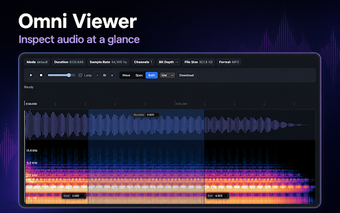
The app supports a wide mix of common and specialist formats beyond basic images and PDFs. Supported categories include office files (DOCX, XLSX, PPTX), PDFs, images (JPG, PNG, GIF, SVG), audio and video (MP3, WAV, OGG, MP4, WebM), tabular data (CSV, JSONL), columnar/data science formats (Parquet, HDF5), diagrams (Mermaid, PlantUML) and automotive files (DBC, ARXML, MF4). This range targets workflows that combine media, docs and structured data in a single place.
How does the extension behave in a typical browsing workflow?
The extension runs inside Chrome and opens files in a browser tab using a drag-and-drop interface or a click-to-browse dialog, so users do not need separate viewers. The developer positions it as a lightweight alternative to installing multiple heavy desktop viewers, which helps keep inspection tasks inside the browser. It is available for Chrome and other Chromium-based browsers, making the tool fit standard desktop browsing setups.
Does the app keep sensitive files on your machine?
All file processing occurs in the browser on the user’s machine, so files are not sent to external servers for rendering. That client-side processing model keeps file bytes local during viewing, which reduces exposure to remote upload risks and aligns with workflows that require keeping sensitive data offline during quick inspections.
Is it suitable for developers, analysts and engineers who need specialised views?
The tool includes developer-focused extras such as syntax highlighting for JSON and YAML, diagram rendering for Mermaid and PlantUML, and support for industrial formats used in automotive engineering. The project is open-source and maintained by the developer, and companion integrations exist (a web version, VSCode and JetBrains plugins), which makes the extension practical for users who want consistent previewing across tools and IDEs.
Practical viewer choice for inspection-focused users with editing trade-offs
The app is a practical choice for people who need quick, browser-based previews of many file types rather than full editing capabilities. It reduces context switching during review tasks, but it does not replace dedicated editors when deep modification, versioning or collaboration is required. Choose the app for fast inspection and consistent previews across tools; continue using specialized editors for heavy editing workflows.